
Native configuration reference: RMCMapSourceActor.h
Names and defaults below are extracted from the current source declaration. Deprecated fields preserve older serialized assets; use their documented replacements for new setup. This table documents configuration, not successful runtime coverage of every field.
| Declaration / default | Category | Access | Editor limits | Purpose |
|---|---|---|---|---|
| TObjectPtr<UMaterialInterface> MapToneMaterial | RPG Maps & Compass|Cartography | Read-only / diagnostic | Hard referenced so the independently installed plugin cooks its image-only tone shader. | |
| TObjectPtr<UMaterialInterface> ShapeSurfaceMaterial | RPG Maps & Compass|Cartography | Read-only / diagnostic | UI shader for vertex-tinted polygon backgrounds and texture fallbacks. | |
| bool bEnableSceneMeshCapture = true | RPG Maps & Compass|Scene Geometry | Editable | Inspect the field alongside the practical route above. | |
| int32 SceneMeshResolution = 2048 | RPG Maps & Compass|Scene Geometry | Editable | Min 256, Max 2048 | Inspect the field alongside the practical route above. |
| float SceneMeshRefreshInterval = .5f | RPG Maps & Compass|Scene Geometry | Editable | Min 0.1, Max 10 | Inspect the field alongside the practical route above. |
| FName SceneMeshIgnoreTag = TEXT("RMC.MapIgnore") | RPG Maps & Compass|Scene Geometry | Editable | Inspect the field alongside the practical route above. | |
| int32 CapturedSceneMeshCount = 0 | RPG Maps & Compass|Diagnostics | Read-only / diagnostic | Inspect the field alongside the practical route above. | |
| TObjectPtr<USceneComponent> SceneRoot | RPG Maps & Compass | Read-only / diagnostic | Inspect the field alongside the practical route above. | |
| TObjectPtr<URMCMapSourceComponent> MapSource | RPG Maps & Compass | Read-only / diagnostic | Inspect the field alongside the practical route above. | |
| TObjectPtr<USceneCaptureComponent2D> OverviewCapture | RPG Maps & Compass | Read-only / diagnostic | Inspect the field alongside the practical route above. | |
| TObjectPtr<USceneCaptureComponent2D> MinimapCapture | RPG Maps & Compass | Read-only / diagnostic | Inspect the field alongside the practical route above. | |
| TObjectPtr<USceneCaptureComponent2D> GeometryDepthCapture | RPG Maps & Compass | Read-only / diagnostic | Depth-only geometry pass aligned to the overview capture. | |
| TObjectPtr<USceneCaptureComponent2D> SurfaceNormalCapture | RPG Maps & Compass|Deprecated | Deprecated compatibility field | Deprecated normal component reference retained for serialized compatibility. Always null. | |
| bool bAutoDiscoverLandscapeBounds = true | RPG Maps & Compass|Capture | Editable | Inspect the field alongside the practical route above. | |
| bool bRefreshWhenTerrainChanges = true | RPG Maps & Compass|Capture | Editable | Recheck loaded terrain bounds at a bounded cadence; rebuild only after topology changes settle. Does not force-load World Partition. | |
| FString DetectionStatus | RPG Maps & Compass|Diagnostics | Read-only / diagnostic | Inspect the field alongside the practical route above. | |
| float SampleCoverage = 0.f | RPG Maps & Compass|Diagnostics | Read-only / diagnostic | Inspect the field alongside the practical route above. | |
| bool bCaptureOverviewOnBeginPlay = true | RPG Maps & Compass|Capture | Editable | Inspect the field alongside the practical route above. | |
| bool bEnableLiveMinimapCapture = true | RPG Maps & Compass|Capture | Editable | Inspect the field alongside the practical route above. | |
| bool bUseMaterialBaseColor = true | RPG Maps & Compass|Capture | Editable | Capture actual opaque/masked material base colors, independent of exposure. Disable for legacy artistic relief. | |
| bool bCaptureRenderedTerrainMaterials = false | RPG Maps & Compass|Capture | Editable | Legacy lit capture, used only when material-base-color mode is disabled. | |
| bool bGenerateTopographyFromTerrain = true | RPG Maps & Compass|Topography | Editable | Build portable north-up relief from real elevation and authored landscape paint layers. | |
| bool bUseLandscapePaintLayers = true | RPG Maps & Compass|Topography | Editable | Use each landscape's authored paint weights so sand, soil, grass, farmland, and rock boundaries remain recognizable. | |
| float PastelStrength = 1.f | RPG Maps & Compass|Cartography | Editable | Min 0, Max 1 | Hand-pigmented relief over measured heights and paint weights. Set to zero for plain relief. Rebuild overview after editing. |
| float PaperGrainStrength = .35f | RPG Maps & Compass|Cartography | Editable | Min 0, Max 1 | Inspect the field alongside the practical route above. |
| FLinearColor CartographyInk = FLinearColor(.065f,.035f,.085f) | RPG Maps & Compass|Cartography | Editable | Inspect the field alongside the practical route above. | |
| FLinearColor CartographyPaper = FLinearColor(.74f,.57f,.34f) | RPG Maps & Compass|Cartography | Editable | Inspect the field alongside the practical route above. | |
| FLinearColor CartographyOcean = FLinearColor(.035f,.12f,.19f) | RPG Maps & Compass|Cartography | Editable | Inspect the field alongside the practical route above. | |
| TMap<FName, FLinearColor> LandscapeLayerColorOverrides | RPG Maps & Compass|Topography | Editable | Optional exact layer-name color overrides. Unlisted layers receive a natural color inferred from their name. | |
| int32 TopographyResolution = 2048 | RPG Maps & Compass|Topography | Editable | Min 128, Max 2048 | Inspect the field alongside the practical route above. |
| FName SeaLevelActorTag = TEXT("RMC.MapSeaLevel") | RPG Maps & Compass|Topography | Editable | Inspect the field alongside the practical route above. | |
| FName WaterRouteActorTag = TEXT("RMC.MapWater") | RPG Maps & Compass|Topography | Editable | Inspect the field alongside the practical route above. | |
| float WaterRouteWidth = 1800.f | RPG Maps & Compass|Topography | Editable | Min 100.0, Max 10000.0 | Inspect the field alongside the practical route above. |
| int32 OverviewResolution = 4096 | RPG Maps & Compass|Capture | Editable | Min 256, Max 4096 | Inspect the field alongside the practical route above. |
| int32 GeometryDepthResolution = 1024 | RPG Maps & Compass|Capture | Editable | Min 256, Max 1024 | Depth-only geometry capture. A 1024 long axis bounds memory while retaining canopy and rock form. |
| bool bCaptureGeometryDepth = true | RPG Maps & Compass|Capture | Editable | Inspect the field alongside the practical route above. | |
| int32 SurfaceNormalResolution = 2048 | RPG Maps & Compass|Deprecated | Deprecated compatibility field | Inspect the field alongside the practical route above. | |
| bool bCaptureSurfaceNormals = false | RPG Maps & Compass|Deprecated | Deprecated compatibility field | Inspect the field alongside the practical route above. | |
| int32 MinimapResolution = 512 | RPG Maps & Compass|Capture | Editable | Min 128, Max 2048 | Inspect the field alongside the practical route above. |
| float InitialCaptureDelay = 1.5f | RPG Maps & Compass|Capture | Editable | Min 0.0, Max 5.0 | Inspect the field alongside the practical route above. |
| float MinimapRefreshInterval = .1f | RPG Maps & Compass|Capture | Editable | Min 0.033, Max 2.0 | Inspect the field alongside the practical route above. |
| float CaptureHeightPadding = 50000.f | RPG Maps & Compass|Capture | Editable | Min 1000.0 | Inspect the field alongside the practical route above. |
| float CaptureExposureBias = 0.f | RPG Maps & Compass|Capture | Editable | Min -8.0, Max 4.0 | Fixed compensation for the map-only manual exposure. Negative values darken very bright landscapes. |
| FName AdditionalBoundsActorTag = TEXT("RMC.MapBounds") | RPG Maps & Compass|Capture | Editable | Inspect the field alongside the practical route above. | |
| FName TerrainGeometryActorTag = TEXT("RMC.MapGeometry") | RPG Maps & Compass|Capture | Editable | Add this tag to mesh-based terrain or roads that should be drawn with Landscape actors on the generated map. |
Native configuration reference: RMCMapSourceComponent.h
Names and defaults below are extracted from the current source declaration. Deprecated fields preserve older serialized assets; use their documented replacements for new setup. This table documents configuration, not successful runtime coverage of every field.
| Declaration / default | Category | Access | Editor limits | Purpose |
|---|---|---|---|---|
| FText RegionName | RPG Maps & Compass | Editable | Inspect the field alongside the practical route above. | |
| TObjectPtr<UTexture> OverviewTexture | RPG Maps & Compass | Editable | Optional authored or runtime-generated north-up overview. | |
| TObjectPtr<UTexture> MinimapTexture | RPG Maps & Compass | Read-only / diagnostic | Optional live local capture. When absent, the minimap falls back to the overview. | |
| TObjectPtr<UTexture> SceneMeshTexture | RPG Maps & Compass | Read-only / diagnostic | North-up actual mesh color capture; alpha stores inverse coverage. Shares overview UVs. | |
| TObjectPtr<UTexture> GeometryDepthTexture | RPG Maps & Compass|Relief | Read-only / diagnostic | North-up linear scene depth aligned to the overview; drives geometry form without moving landmarks. | |
| FLinearColor GeometryDepthMetrics = FLinearColor::Black | RPG Maps & Compass|Relief | Read-only / diagnostic | (inverse width, inverse height, world units per U texel, world units per V texel). | |
| float GeometryDepthFar = 0.f | RPG Maps & Compass|Relief | Read-only / diagnostic | Clear depth used to reject pixels that contain no captured surface. | |
| TObjectPtr<UTexture> SurfaceNormalTexture | RPG Maps & Compass|Deprecated | Deprecated compatibility field | Deprecated normal companion retained only so older placed actors deserialize safely. Always null. | |
| TObjectPtr<UTexture> ReliefTexture | RPG Maps & Compass|Relief | Read-only / diagnostic | Cached elevation-derived lighting, never a replacement for material colors. | |
| float SurfaceDetailSoftening = .15f | RPG Maps & Compass|Artistic Treatment | Editable | Min 0, Max 1 | Suppress small repeating surface detail in the captured map without moving geography or markers. |
| float ReliefStrength = .65f | RPG Maps & Compass|Relief | Editable | Min 0, Max 1 | Inspect the field alongside the practical route above. |
| float GeometryHeightStrength = .55f | RPG Maps & Compass|Relief | Editable | Min 0, Max 1 | Reconstruct restrained directional form from captured geometry depth. |
| float GeometryContactStrength = .22f | RPG Maps & Compass|Relief | Editable | Min 0, Max 1 | Darken lower surfaces immediately beside taller geometry such as rocks and tree canopies. |
| float GeometryReliefStrength = 0.f | RPG Maps & Compass|Deprecated | Deprecated compatibility field | Deprecated normal-lighting strength retained for older serialized sources. | |
| float ReliefContrast = 1.35f | RPG Maps & Compass|Artistic Treatment | Editable | Min 0.5, Max 2 | Shape the measured relief around neutral lighting so ridges and escarpments read at map scale. |
| float ReliefShadowFloor = .55f | RPG Maps & Compass|Artistic Treatment | Editable | Min 0.25, Max 1 | Prevent the artistic relief pass from crushing valleys and back-facing slopes to black. |
| float CliffInkStrength = .25f | RPG Maps & Compass|Artistic Treatment | Editable | Min 0, Max 1 | Add restrained ink-like definition only where measured relief departs from flat terrain. |
| float ContourStrength = 0.f | RPG Maps & Compass|Relief | Editable | Min 0, Max 1 | Inspect the field alongside the practical route above. |
| bool bUseOwnerLocationAsCenter = true | RPG Maps & Compass | Editable | Inspect the field alongside the practical route above. | |
| FVector2D WorldCenter = FVector2D::ZeroVector | RPG Maps & Compass | Editable | Inspect the field alongside the practical route above. | |
| FVector2D WorldExtent = FVector2D(200000.f, 200000.f) | RPG Maps & Compass | Editable | Min 100.0 | Inspect the field alongside the practical route above. |
| int32 Priority = 0 | RPG Maps & Compass | Editable | Inspect the field alongside the practical route above. | |
| bool bActive = true | RPG Maps & Compass | Editable | Inspect the field alongside the practical route above. |
Verified native base-color orientation
This authentic GPU capture uses the existing host’s calibration floor and two geometry landmarks. North is +world X; east is +world Y. The native scene’s floor material uses a fixed inverse UV rotation to match its mesh mapping. Your own mesh UVs may require a different calibration.
The legacy lit comparison at exposure bias -3 remained pale and washed out in this validation scene. The world-map UI also stretches the calibration image at its current layout. Neither image is approved for final presentation; they are excluded from this guide’s illustrations.
Placed native parameter views
These seven views display39 real, noneditable Unreal PropertyEditor handles from the placed native actor. They match its45 public native declarations with six structural component references excluded. Private transient targets are not Details settings. The generic native PropertyEditor framing hides component flag subpanels and groups actual property rows; it changes the view, not the saved values. Actor transform rows remain visible for context. Diagnostics here are saved/editor values, not a claim that capture has already run.
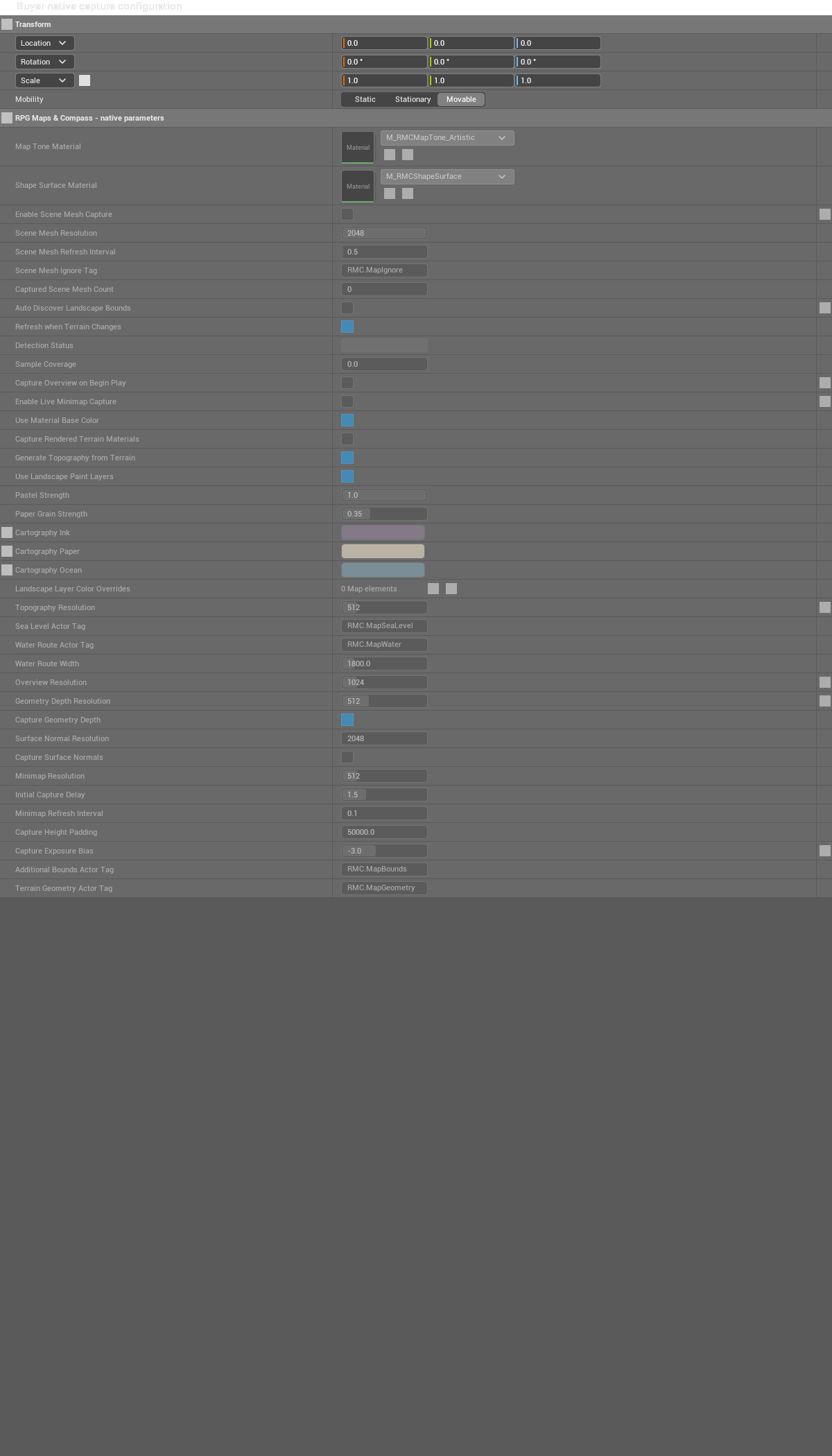
Actual placed native parameters: All. Empty lower canvas is trimmed at document viewport level; click for the unchanged full original.

Actual placed native parameters: Capture. Empty lower canvas is trimmed at document viewport level; click for the unchanged full original.

Actual placed native parameters: SceneGeometry. Empty lower canvas is trimmed at document viewport level; click for the unchanged full original.

Actual placed native parameters: Topography. Empty lower canvas is trimmed at document viewport level; click for the unchanged full original.

Actual placed native parameters: Cartography. Empty lower canvas is trimmed at document viewport level; click for the unchanged full original.

Actual placed native parameters: Diagnostics. Empty lower canvas is trimmed at document viewport level; click for the unchanged full original.

Actual placed native parameters: Deprecated. Empty lower canvas is trimmed at document viewport level; click for the unchanged full original.
Create a native landmark actor
- Create a Blueprint subclass of RMC Map Marker Actor in your existing game Content and place it at the landmark.
- On its Marker component, set Marker Label, Category, Marker Color and Show On Minimap / Compass / World Map.
- Play with the owning local player and query Get Visible Markers. Use the returned Id and World Location in your UI; the actor does not require a visible mesh.
The saved BP_RMC_BuyerNativeMarker now has clean scoped public read/explicit registration proof and authentic native captures. Automatic local-player BeginPlay/EndPlay and designed UI remain separate coverage gaps.